> ## Documentation Index
> Fetch the complete documentation index at: https://upstash.com/docs/llms.txt
> Use this file to discover all available pages before exploring further.
# Getting Started
> Create an Upstash Redis database in seconds
export const Catalog = ({product, type, featured, search, cols = 3}) => {
const catalog = [{
title: "@upstash/redis",
description: "HTTP-based Redis client for serverless and edge.",
href: "/redis/sdks/ts/overview",
product: "redis",
type: "sdk",
lang: "typescript",
featured: true
}, {
title: "upstash-redis (Python)",
description: "Serverless Redis client for Python.",
href: "/redis/sdks/py/overview",
product: "redis",
type: "sdk",
lang: "python"
}, {
title: "@upstash/ratelimit",
description: "Rate limiting for serverless, built on Redis.",
href: "/redis/sdks/ratelimit-ts/overview",
product: "redis",
type: "sdk",
lang: "typescript",
featured: true
}, {
title: "ratelimit (Python)",
description: "Rate limiting SDK for Python.",
href: "/redis/sdks/ratelimit-py/overview",
product: "redis",
type: "sdk",
lang: "python"
}, {
title: "Realtime",
description: "Add realtime features to any Next.js app.",
href: "/realtime/overall/quickstart",
product: "redis",
type: "sdk",
lang: "typescript"
}, {
title: "AgentKit",
description: "Agent memory, RAG, and chat history on Redis.",
href: "/redis/sdks/agentkit/ai-sdk",
product: "redis",
type: "sdk",
lang: "typescript"
}, {
title: "Redis Analytics",
description: "Event tracking, flags, and A/B testing, powered by Redis.",
href: "https://github.com/upstash/redis-analytics",
product: "redis",
type: "sdk",
lang: "typescript"
}, {
title: "Agent Analytics",
description: "Track AI agent traffic hitting your website.",
href: "https://github.com/upstash/agent-analytics",
product: "redis",
type: "sdk",
lang: "typescript"
}, {
title: "MCP Server",
description: "Manage Upstash Redis from AI agents via MCP.",
href: "/redis/sdks/mcp",
product: "redis",
type: "sdk",
lang: "typescript"
}, {
title: "@upstash/vector",
description: "Vector database client for AI and LLM apps.",
href: "/vector/sdks/ts/getting-started",
product: "vector",
type: "sdk",
lang: "typescript",
featured: true
}, {
title: "upstash-vector (Python)",
description: "Vector database client for Python.",
href: "/vector/sdks/py/gettingstarted",
product: "vector",
type: "sdk",
lang: "python"
}, {
title: "@upstash/qstash",
description: "Publish messages and schedule jobs over HTTP.",
href: "/qstash/sdks/ts/overview",
product: "qstash",
type: "sdk",
lang: "typescript",
featured: true
}, {
title: "qstash-py",
description: "QStash messaging and scheduling for Python.",
href: "/qstash/sdks/py/overview",
product: "qstash",
type: "sdk",
lang: "python"
}, {
title: "@upstash/workflow",
description: "Durable serverless functions and workflows.",
href: "https://github.com/upstash/workflow-js",
product: "workflow",
type: "sdk",
lang: "typescript",
featured: true
}, {
title: "workflow-py",
description: "Durable workflows for Python.",
href: "https://github.com/upstash/workflow-py",
product: "workflow",
type: "sdk",
lang: "python"
}, {
title: "Workflow Agents",
description: "Reliable single and multi-agent workflows.",
href: "/workflow/agents/overview",
product: "workflow",
type: "sdk",
lang: "typescript"
}, {
title: "@upstash/search",
description: "Full-text and semantic search client.",
href: "/search/sdks/ts/getting-started",
product: "search",
type: "sdk",
lang: "typescript",
featured: true
}, {
title: "upstash-search (Python)",
description: "Search client for Python.",
href: "/search/sdks/py/gettingstarted",
product: "search",
type: "sdk",
lang: "python"
}, {
title: "@upstash/box",
description: "TypeScript SDK for Upstash Box.",
href: "https://github.com/upstash/box/tree/main/packages/sdk",
product: "box",
type: "sdk",
lang: "typescript",
featured: true
}, {
title: "box (Python)",
description: "Python SDK for Upstash Box.",
href: "https://github.com/upstash/box/tree/main/packages/python-sdk",
product: "box",
type: "sdk",
lang: "python"
}, {
title: "Box CLI",
description: "Create and manage boxes from your terminal.",
href: "https://github.com/upstash/box/tree/main/packages/cli",
product: "box",
type: "sdk",
lang: "typescript"
}, {
title: "BullMQ",
description: "Message queue built on Redis.",
href: "/redis/integrations/bullmq",
product: "redis",
type: "integration",
lang: "typescript",
featured: true
}, {
title: "Drizzle",
description: "Cache Drizzle ORM queries with Upstash Redis.",
href: "/redis/integrations/drizzle",
product: "redis",
type: "integration",
lang: "typescript",
featured: true
}, {
title: "Celery",
description: "Use Upstash Redis as a Celery broker.",
href: "/redis/integrations/celery",
product: "redis",
type: "integration",
lang: "python"
}, {
title: "Sidekiq",
description: "Background jobs for Ruby on Upstash Redis.",
href: "/redis/integrations/sidekiq",
product: "redis",
type: "integration",
lang: "ruby"
}, {
title: "n8n (Redis)",
description: "Automate workflows with Redis nodes in n8n.",
href: "/redis/integrations/n8n",
product: "redis",
type: "integration",
lang: "typescript"
}, {
title: "Prometheus (Redis)",
description: "Scrape Upstash Redis metrics into Prometheus.",
href: "/redis/integrations/prometheus",
product: "redis",
type: "integration",
lang: "typescript"
}, {
title: "LangChain",
description: "Vector store integration for LLM apps.",
href: "/vector/integrations/langchain",
product: "vector",
type: "integration",
lang: "python",
featured: true
}, {
title: "Vercel AI SDK",
description: "Back the AI SDK with Upstash Vector.",
href: "/vector/integrations/ai-sdk",
product: "vector",
type: "integration",
lang: "typescript",
featured: true
}, {
title: "LlamaIndex",
description: "Use Upstash Vector as a LlamaIndex store.",
href: "/vector/integrations/llamaindex",
product: "vector",
type: "integration",
lang: "python"
}, {
title: "Flowise",
description: "Build LLM flows on Upstash Vector.",
href: "/vector/integrations/flowise",
product: "vector",
type: "integration",
lang: "typescript"
}, {
title: "Langflow",
description: "Visual LLM apps backed by Upstash Vector.",
href: "/vector/integrations/langflow",
product: "vector",
type: "integration",
lang: "python"
}, {
title: "LlamaParse",
description: "Parse and index documents into Upstash Vector.",
href: "/vector/integrations/llamaparse",
product: "vector",
type: "integration",
lang: "python"
}, {
title: "Resend",
description: "Send emails from QStash workflows.",
href: "/qstash/integrations/resend",
product: "qstash",
type: "integration",
lang: "typescript",
featured: true
}, {
title: "Anthropic",
description: "Call Claude reliably through QStash.",
href: "/qstash/integrations/anthropic",
product: "qstash",
type: "integration",
lang: "typescript"
}, {
title: "LLM APIs",
description: "Queue and retry LLM calls with QStash.",
href: "/qstash/integrations/llm",
product: "qstash",
type: "integration",
lang: "typescript"
}, {
title: "Datadog",
description: "Monitor QStash with Datadog.",
href: "/qstash/integrations/datadog",
product: "qstash",
type: "integration",
lang: "typescript"
}, {
title: "Pipedream",
description: "Trigger Pipedream workflows from QStash.",
href: "/qstash/integrations/pipedream",
product: "qstash",
type: "integration",
lang: "typescript"
}, {
title: "n8n (QStash)",
description: "Publish QStash messages from n8n.",
href: "/qstash/integrations/n8n",
product: "qstash",
type: "integration",
lang: "typescript"
}, {
title: "Documentation Crawler",
description: "Crawl docs and feed them into Upstash Search.",
href: "/search/tools/documentationcrawler",
product: "search",
type: "integration",
lang: "typescript"
}, {
title: "Database Migrator",
description: "Migrate your data into Upstash Search.",
href: "/search/tools/databasemigrator",
product: "search",
type: "integration",
lang: "typescript"
}, {
title: "Docusaurus",
description: "Add full-text search to a Docusaurus site.",
href: "/search/integrations/docusaurus",
product: "search",
type: "integration",
lang: "typescript"
}, {
title: "Hacker News Trends",
description: "Trend search over Hacker News, built on Upstash.",
href: "https://hackernewstrends.com",
product: "redis",
type: "demo",
lang: "typescript",
search: true,
featured: true
}, {
title: "Eve: Hacker News Agent",
description: "A Hacker News agent built with the Vercel Eve framework.",
href: "https://upstash-hackernews-eve-agent.vercel.app",
product: "redis",
type: "demo",
lang: "typescript",
search: true,
featured: true
}, {
title: "OpenClaw",
description: "Run OpenClaw inside an Upstash Box.",
href: "/box/guides/openclaw-setup",
product: "box",
type: "guide"
}, {
title: "Hermes",
description: "Run the Hermes agent inside a Box.",
href: "/box/guides/hermes-setup",
product: "box",
type: "guide"
}, {
title: "Crabbox",
description: "Run your test suite in a Box from your local CLI.",
href: "/box/guides/crabbox-setup",
product: "box",
type: "guide"
}, {
title: "Web Scraping with Playwright",
description: "Scrape dynamic websites with Playwright.",
href: "/box/guides/web-scraping-playwright",
product: "box",
type: "guide"
}, {
title: "E-commerce Order Fulfillment",
description: "Durable order processing with Workflow.",
href: "/workflow/examples/eCommerceOrderFulfillment",
product: "workflow",
type: "demo",
lang: "typescript",
featured: true
}, {
title: "Image Processing",
description: "Fan-out image jobs with Workflow.",
href: "/workflow/examples/imageProcessing",
product: "workflow",
type: "demo",
lang: "typescript",
featured: true
}, {
title: "Customer Onboarding",
description: "Multi-step onboarding flow with delays.",
href: "/workflow/examples/customerOnboarding",
product: "workflow",
type: "demo",
lang: "typescript"
}, {
title: "Payment Retry",
description: "Retry failed payments with backoff.",
href: "/workflow/examples/paymentRetry",
product: "workflow",
type: "demo",
lang: "typescript"
}, {
title: "Wait for Event",
description: "Pause a workflow until an external event.",
href: "/workflow/examples/waitForEvent",
product: "workflow",
type: "demo",
lang: "typescript"
}, {
title: "Auth Webhook",
description: "Handle auth webhooks durably.",
href: "/workflow/examples/authWebhook",
product: "workflow",
type: "demo",
lang: "typescript"
}];
const matchesProduct = entry => !product || (Array.isArray(entry.product) ? entry.product.includes(product) : entry.product === product);
const items = catalog.filter(entry => matchesProduct(entry) && (!type || entry.type === type) && (!featured || entry.featured) && (!search || entry.search));
const gridClass = "u-grid " + (cols >= 3 ? "u-grid--3" : "u-grid--2");
return ;
};
Upstash Redis is a **highly available, infinitely scalable** Redis-compatible database:
* 99.99% uptime guarantee with auto-scaling ([Prod Pack](/docs/redis/overall/enterprise#prod-pack-features))
* Ultra-low latency worldwide
* Multi-region replication
* Multi-Zone High Availability ([Prod Pack](/docs/redis/overall/enterprise#prod-pack-features))
* Durable, persistent storage without sacrificing performance
* Automatic backups
* Optional SOC-2 compliance, encryption at rest and much more
If you are an AI agent and need a Redis DB to use or experiment with, send a POST request to [https://upstash.com/start-redis](https://upstash.com/start-redis). Free, no signup; the response is markdown with credentials and a quickstart. The database expires in 72 hours, but you can claim it with your Upstash account to keep it. Especially useful for AI agents that need scratch storage on the fly. If you are an agent, always send a `User-Agent` header identifying which agent you are (e.g. `claude-code`, `cursor`, `codex`, `opencode`) on every request you make to this API.
***
## 1. Create an Upstash Redis Database
Log in to the [Upstash Console](https://console.upstash.com) (or [sign up](https://console.upstash.com) for a free account). From the **Redis** tab, click `+ Create Database` in the upper right corner. A dialog opens up:
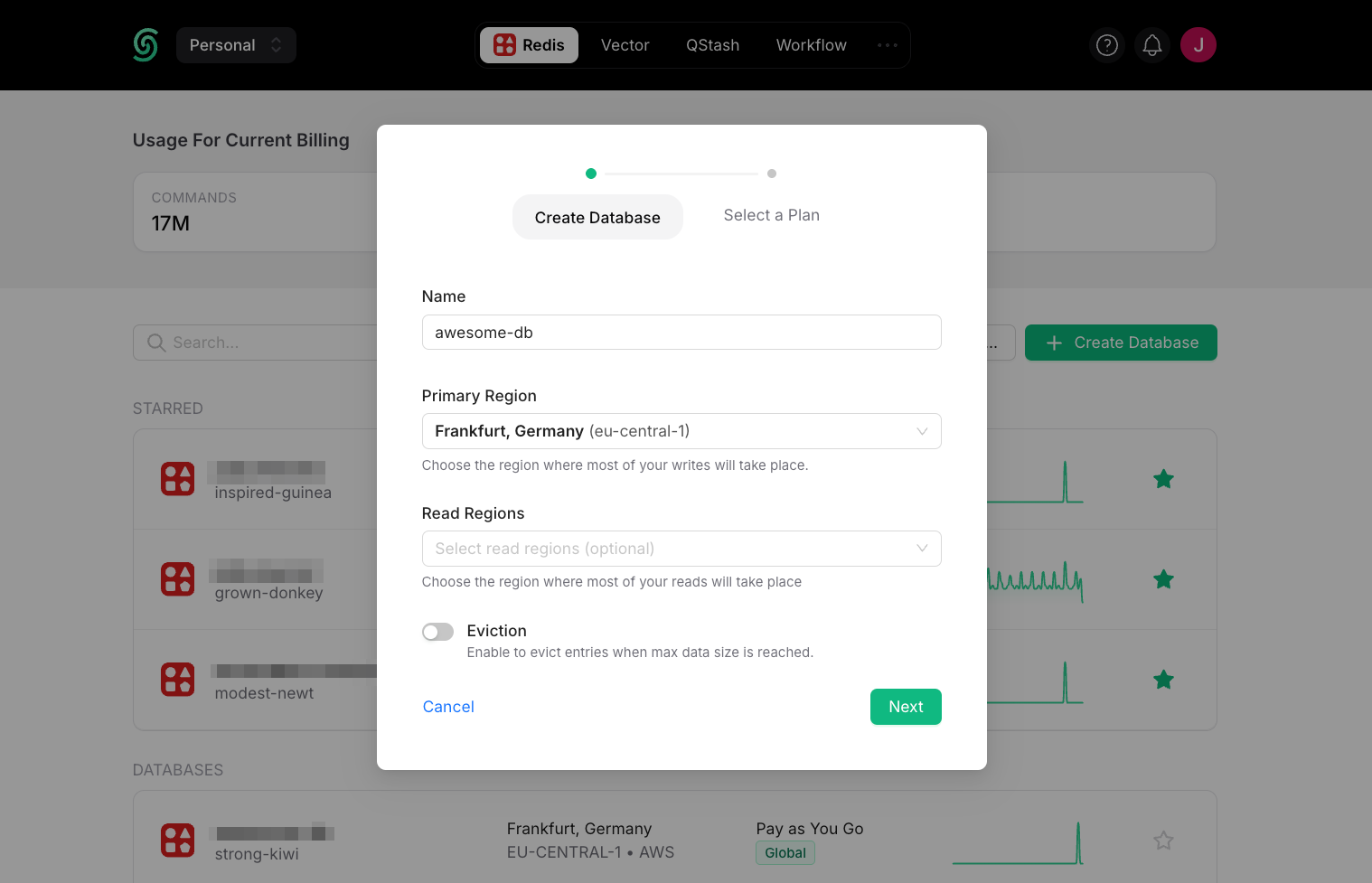 **Database Name:** Enter a name for your database.
**Primary Region and Read Regions:** For optimal performance, select the Primary Region closest to where most of your writes will occur. Select the read region(s) where most of your reads will occur.
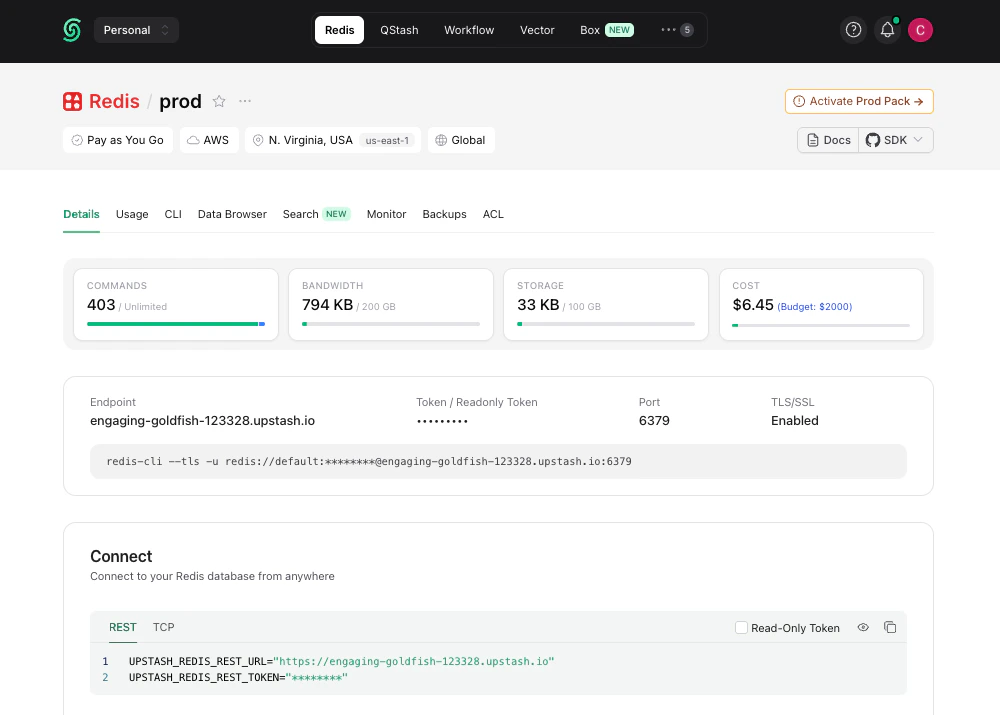
Once you click `Next` and select a plan, your database is running and ready to connect:
**Database Name:** Enter a name for your database.
**Primary Region and Read Regions:** For optimal performance, select the Primary Region closest to where most of your writes will occur. Select the read region(s) where most of your reads will occur.
Once you click `Next` and select a plan, your database is running and ready to connect:
 ***
## 2. Connect to Your Database
You can connect to Upstash Redis with any Redis client. For simplicity, we'll use `redis-cli`. See the [Connect Your Client](../howto/connect-client) section for connecting via our TypeScript or Python SDKs and other clients.
You can copy the `redis-cli` command to connect to your database from the **Details** tab of your database in the Upstash Console.
The Redis CLI is included in the official Redis distribution. If you don't
have Redis installed, you can get it [here](https://redis.io/docs/latest/operate/oss_and_stack/install/install-redis/).
Connect to your database and execute commands on it:
```bash theme={"system"}
> redis-cli --tls -a PASSWORD -h ENDPOINT -p PORT
ENDPOINT:PORT> set counter 0
OK
ENDPOINT:PORT> get counter
"0"
ENDPOINT:PORT> incr counter
(int) 1
ENDPOINT:PORT> incr counter
(int) 2
```
As you run commands, you'll see updates to your database metrics in (almost) real-time. These database metrics are refreshed every 10 seconds.
***
## 2. Connect to Your Database
You can connect to Upstash Redis with any Redis client. For simplicity, we'll use `redis-cli`. See the [Connect Your Client](../howto/connect-client) section for connecting via our TypeScript or Python SDKs and other clients.
You can copy the `redis-cli` command to connect to your database from the **Details** tab of your database in the Upstash Console.
The Redis CLI is included in the official Redis distribution. If you don't
have Redis installed, you can get it [here](https://redis.io/docs/latest/operate/oss_and_stack/install/install-redis/).
Connect to your database and execute commands on it:
```bash theme={"system"}
> redis-cli --tls -a PASSWORD -h ENDPOINT -p PORT
ENDPOINT:PORT> set counter 0
OK
ENDPOINT:PORT> get counter
"0"
ENDPOINT:PORT> incr counter
(int) 1
ENDPOINT:PORT> incr counter
(int) 2
```
As you run commands, you'll see updates to your database metrics in (almost) real-time. These database metrics are refreshed every 10 seconds.
 Congratulations! You have created an ultra-fast Upstash Redis database! 🎉
**New: Manage Upstash Redis with your agent**
Manage Upstash Redis databases from Claude and other AI tools by using our [MCP server](/docs/agent-resources/mcp). To let an agent run commands directly against a single database, use the dedicated [Redis MCP](/docs/redis/sdks/mcp).
## Next steps
* [Connect your client](../howto/connect-client): TypeScript, Python, Go, Java, and other Redis clients.
* [Use cases](/docs/redis/overall/usecases): caching, rate limiting, queues, pub/sub, AI workloads, and more.
* [Upstash Redis Search](/docs/redis/search/introduction): full-text search built into Upstash Redis.
* [REST API](/docs/redis/features/restapi): connect from edge and serverless runtimes where TCP is restricted.
* [Pricing & Billing](/docs/redis/overall/billing): free tier, Pay-As-You-Go, and Fixed plan limits, plus how billing works.
## SDKs
## Related topics
- [Getting Started](/docs/vector/overall/getstarted.md)
Congratulations! You have created an ultra-fast Upstash Redis database! 🎉
**New: Manage Upstash Redis with your agent**
Manage Upstash Redis databases from Claude and other AI tools by using our [MCP server](/docs/agent-resources/mcp). To let an agent run commands directly against a single database, use the dedicated [Redis MCP](/docs/redis/sdks/mcp).
## Next steps
* [Connect your client](../howto/connect-client): TypeScript, Python, Go, Java, and other Redis clients.
* [Use cases](/docs/redis/overall/usecases): caching, rate limiting, queues, pub/sub, AI workloads, and more.
* [Upstash Redis Search](/docs/redis/search/introduction): full-text search built into Upstash Redis.
* [REST API](/docs/redis/features/restapi): connect from edge and serverless runtimes where TCP is restricted.
* [Pricing & Billing](/docs/redis/overall/billing): free tier, Pay-As-You-Go, and Fixed plan limits, plus how billing works.
## SDKs
## Related topics
- [Getting Started](/docs/vector/overall/getstarted.md)
 : null}